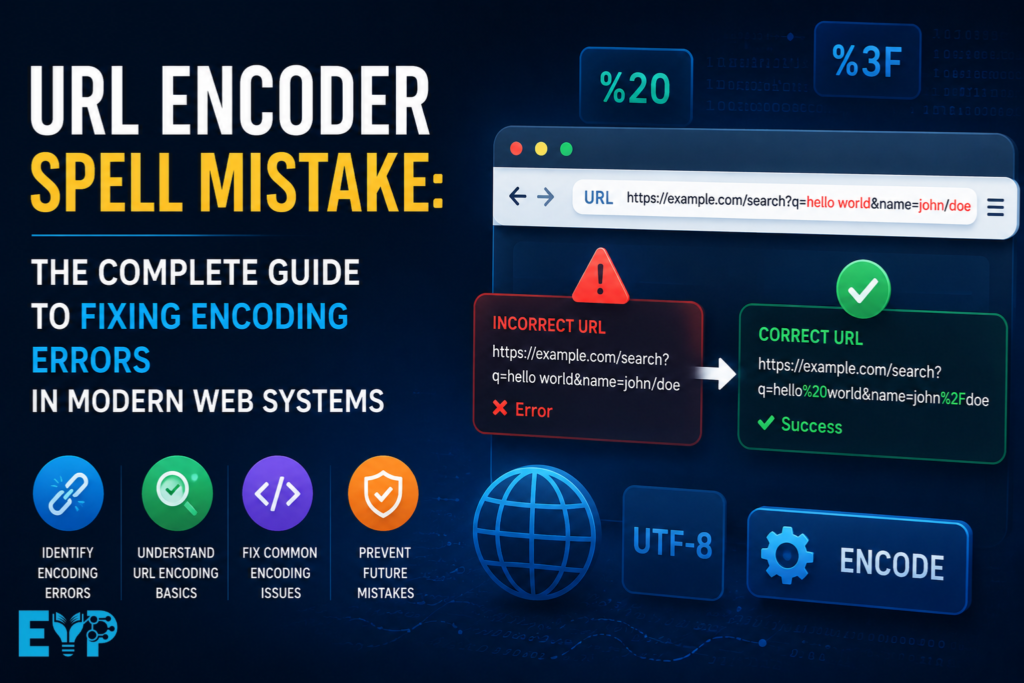
If you’ve ever clicked a link that looked perfectly fine but still broke the page, you’ve already dealt with a URL Encoder Spell Mistake in the real world. It’s one of those silent problems that doesn’t always throw loud errors. Instead, it quietly breaks requests, corrupts data, and confuses both users and developers.
Most of the time, the root cause sits inside URL Encoder, URL Decoding, or inconsistent handling of Query Parameters across different layers of a system. One small mismatch can turn a clean Request URL into a Malformed URL that no longer behaves the way you expect.
Let’s break this down in a way that actually feels practical, not theoretical.
What a URL Encoding Error Really Means (And Why “Spell Mistake” Happens)
A URL Encoder Spell Mistake is not about spelling in the normal sense. It’s about structure breaking at the character level. When special characters are not properly converted into safe formats, the URL stops behaving correctly.
For example, a space in a URL should become %20. If it doesn’t, browsers interpret it as a separator. That one missing transformation can break the entire request flow.
This issue usually appears when developers manually build URLs or forget to apply encoding functions. A single unescaped character can turn a valid link into a Broken URL or even a completely unusable endpoint.
In real applications, this shows up in search queries, API calls, redirect links, tracking URLs, and dynamic filters.
How URL Encoding Works in Real Web Systems
URL encoding is essentially a translation system. It converts unsafe or reserved characters into a format that can safely travel across the internet without breaking structure.
This process follows standards defined in RFC 3986, which tells browsers and servers what is safe and what must be encoded. Characters like spaces, ampersands, question marks, and hashes are not safe when used inside data values.
Here’s how the system usually works in practice:
- A user enters input like a search term or form data
- The system applies URL Encoding
- The browser sends a structured HTTP Request
- The server receives and applies URL Decoding
- The backend processes the clean data
If any step breaks or gets skipped, the system produces a URL Encoding Error or a corrupted Query String.
In complex systems with APIs, CDNs, and proxies, this flow becomes even more sensitive.
In real web systems, a URL Encoder converts unsafe characters like spaces, symbols, and non-ASCII text into percent-encoded format. This ensures data travels safely through browsers, servers, and APIs. It prevents broken requests, maintains data integrity, and enables smooth communication between different web components.
URL Encoding vs URL Decoding (Why This Confuses Developers)
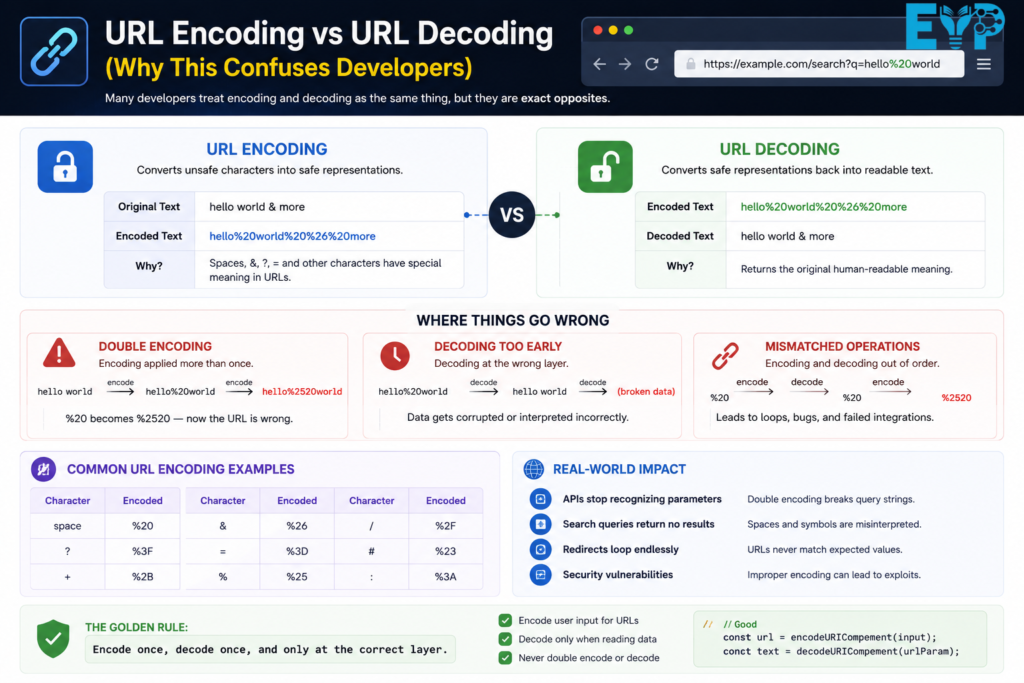
Many developers treat encoding and decoding as the same thing, but they are exact opposites.
URL Encoder converts unsafe characters into safe representations like %20.
URL Decoding converts those safe values back into readable text.
The problem happens when systems apply encoding twice or decode too early. For example, %20 turning into %2520 is a classic Double Encoding issue.
This is where URLs start behaving strangely. APIs stop recognizing parameters. Search queries break. Redirects loop endlessly.
In real-world systems, the rule is simple: encode once, decode once, and only at the correct layer.
Developers often confuse encoding and decoding because they are opposite processes. A URL Encoder converts special characters into safe formats for transmission, while decoding restores them for readability. Misunderstanding their roles can lead to broken links, data mismatches, and errors in API communication or web applications.
Why URL Encoding Errors Happen in Real Development Environments
Most URL encoding problems don’t come from complexity. They come from inconsistency between systems.
One service encodes the data. Another encodes it again. A third expects raw input. Suddenly, everything falls apart.
Here are the most common real-world causes:
- Manual URL Construction instead of safe encoding functions
- Frontend and backend using different encoding logic
- Framework-level auto-encoding conflicts
- Copy-pasted URLs from logs or browsers
- Unvalidated user input containing special characters
Even a missing JavaScript function like encodeURIComponent() can trigger a full API request encoding error in production.
URL encoding errors usually happen because different systems handle data in different ways. Frontend apps, backend servers, and third-party APIs may all apply their own rules, which leads to mismatched or missing encoding. A reliable URL Encoder is often overlooked, especially when developers assume browsers will automatically fix formatting issues.
Common Types of URL Encoding Mistakes (With Real Impact)
Unencoded Spaces and Query Breakage
Spaces are one of the simplest but most damaging mistakes. A space must be converted into %20, but many systems forget this.
When a space remains unencoded, the browser splits the URL into multiple parts. This creates a Broken Query String Issue that immediately corrupts the request.
It often appears in search bars, filters, and dynamic user-generated queries.
Unencoded spaces in URLs can split query parameters and cause broken requests or incorrect results. This often leads to failed API calls and page errors. A reliable URL Encoder converts spaces into safe characters like %20, ensuring accurate data transmission and stable communication between systems and browsers.
Broken Query Parameters Due to Special Characters
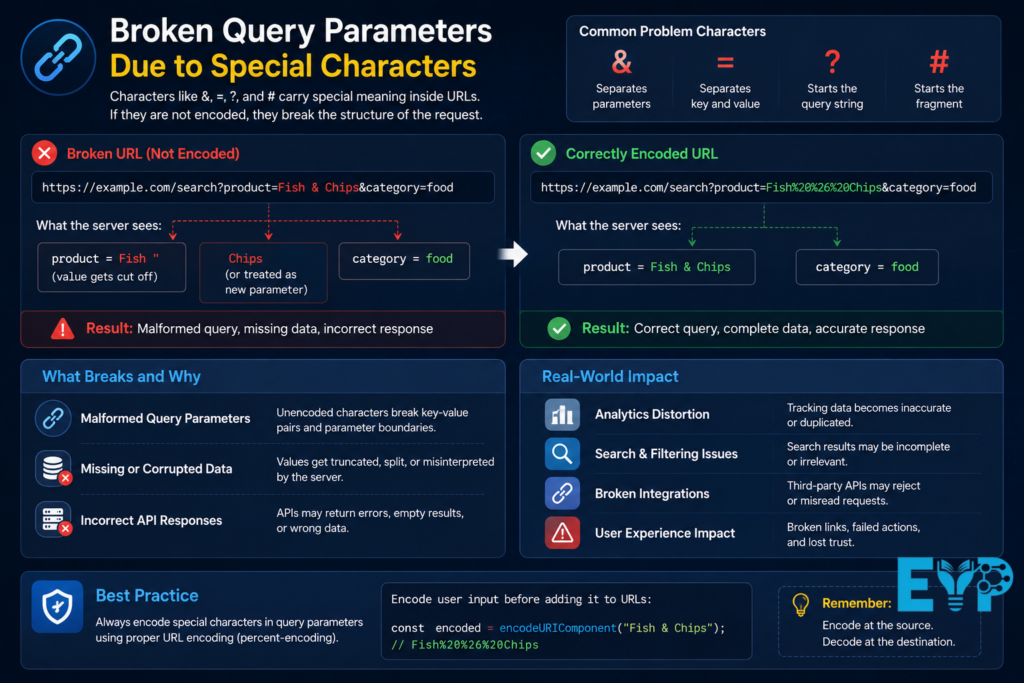
Characters like &, =, ?, and # carry special meaning inside URLs. If they are not encoded, they break the structure of the request.
For example, a product name like “Fish & Chips” gets split into two separate parameters.
This leads to Malformed Query Parameters, missing data, and incorrect API responses.
In analytics systems, it can also distort tracking results completely.
UTF-8 and Non-English Character Corruption
Modern applications handle global data, which means UTF-8 is everywhere.
When systems fail to correctly apply UTF-8 Encoding, characters like é, ñ, or emojis become unreadable sequences.
This issue is extremely common in multilingual platforms, especially when backend systems assume ASCII instead of full Unicode support.
The result is broken text, missing values, and inconsistent database entries.
Double Encoding Problems (Recursive Encoding)
This is one of the most frustrating issues in real systems.
It happens when encoded data gets encoded again. So %20 becomes %2520.
This usually happens in middleware layers, API gateways, or redirect systems where multiple services handle encoding independently.
The worst part is that the URL still looks valid at first glance, which makes debugging slow and painful.
Double encoding happens when a URL is encoded more than once, turning valid characters into corrupted strings. This often breaks API calls and redirects. A proper URL Encoder prevents recursive encoding by ensuring each character is encoded only once, maintaining clean URLs and reliable system communication.
Real-World Examples of URL Encoding Failures and Fixes
Imagine an e-commerce search URL like this:
/search?q=mobile phones & accessories
This breaks immediately because & splits parameters incorrectly.
The correct version becomes:
/search?q=mobile%20phones%20%26%20accessories
Now the system reads it correctly as a single query.
Another common case appears in marketing links. A broken Tracking Parameter (UTM) can destroy campaign attribution. Suddenly, traffic looks untracked even when it exists.
In APIs, missing encoding often leads to Web Request Failure Due to Encoding, especially when filters contain special characters or nested JSON structures.
In real applications, unencoded spaces, ampersands, or symbols often break URLs, causing API failures or 404 errors. A proper URL Encoder fixes these issues by converting special characters into safe formats, ensuring reliable requests, accurate data transfer, and smooth communication between browsers, servers, and external services.
How Encoding Errors Break APIs and Backend Communication
APIs rely on structured and predictable URLs. When encoding breaks, the backend receives corrupted input.
This is especially common in REST API systems where Query Parameters define how data is filtered or processed.
Typical failures include:
- Authentication tokens breaking inside URLs
- Filters returning incorrect or empty results
- Endpoints rejecting valid requests
- Partial data parsing in backend services
In a Microservices Architecture, this problem becomes even worse because each service may interpret encoding slightly differently.
How Encoding Errors Break APIs and Backend Communication
Even a small encoding mistake can cause major issues in API requests and server communication. When special characters are not properly encoded, the URL Encoder process fails, leading to broken parameters, data corruption, authentication errors, or failed requests. Proper URL encoding ensures smooth data transfer between applications and backend systems.
Frontend vs Backend Encoding Conflicts
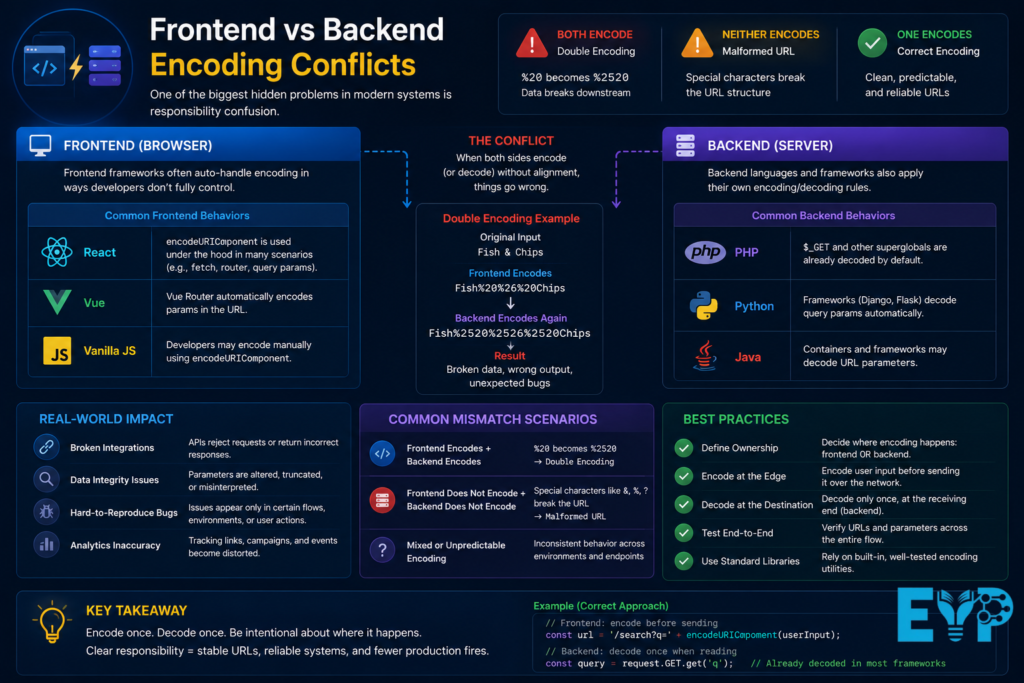
One of the biggest hidden problems in modern systems is responsibility confusion.
Should encoding happen in the frontend? Or backend?
If both do it, you get Double Encoding.
If neither does it, you get a Malformed URL.
Frontend frameworks like React or Vue often auto-handle encoding in ways developers don’t fully control. Backend languages like PHP, Python, and Java also apply their own rules.
This mismatch creates unpredictable bugs that are hard to reproduce and even harder to fix.
Conflicts between frontend and backend encoding happen when both systems apply different rules to the same data. This can corrupt URLs or break requests. A consistent URL Encoder ensures both sides handle characters the same way, preventing mismatches, improving API communication, and maintaining smooth data flow across the application.
SEO Risks and Indexing Problems Caused by Encoding Mistakes
Encoding errors don’t just break APIs. They also damage SEO.
Search engines treat different encoded versions of the same URL as separate pages. That leads to Duplicate URLs, which confuses indexing systems.
This wastes Crawl Budget and weakens overall site authority.
Other SEO problems include:
- Broken Canonicalization signals
- Incorrect handling of Dynamic URLs
- Distorted Tracking Parameters (UTM)
- Weak internal linking consistency
Over time, this silently reduces Search Visibility without obvious technical alerts.
Encoding errors can create serious SEO issues by generating broken URLs, duplicate pages, and crawlability problems. A reliable URL Encoder helps ensure search engines correctly interpret web addresses, improving indexing accuracy, preserving link equity, and preventing visibility losses that can negatively impact organic search performance.
How Developers Detect URL Encoding Issues
Most encoding issues only show up after something breaks in production.
Developers typically find them using:
- Browser DevTools network inspection
- Server logs showing malformed requests
- API testing tools like Postman
- Debugging URL Parsing failures in backend logs
- Monitoring systems tracking failed requests
The tricky part is that encoding issues often appear only under specific user inputs, making them hard to reproduce consistently.
Developers identify encoding problems by testing URLs, reviewing server logs, and monitoring API responses for errors. A proper URL Encoder helps reveal incorrectly formatted characters, broken query parameters, and failed requests. Early detection ensures smoother website functionality, accurate data transmission, and a better user experience.
Tools That Help Fix and Prevent Encoding Errors
Modern development environments already provide strong tools you just need to use them correctly.
Common solutions include:
- JavaScript:
encodeURIComponent() - Python:
urllib.parse.quote() - PHP:
urlencode() - Java:
URLEncoder
These functions ensure safe URL Construction without manual errors.
API gateways, reverse proxies, and CDNs also help by normalizing requests before they reach backend systems.
Best Practices to Prevent URL Encoding Mistakes
Prevention is always easier than debugging.
Here are practical rules that actually work in production:
- Always encode once, never multiple times
- Never manually construct URLs in production code
- Validate user input before inserting into URLs
- Handle UTF-8 Encoding properly across all systems
- Test edge cases like emojis, symbols, and multilingual text
A simple mindset shift helps a lot: never trust raw input inside a URL.
Using a trusted URL Encoder, validating URLs before deployment, and testing query parameters regularly can prevent common encoding errors. Developers should follow web standards, encode special characters correctly, and perform routine checks to ensure links, APIs, and website functions work reliably across all platforms and browsers.
Secure URL Encoding and Why It Matters
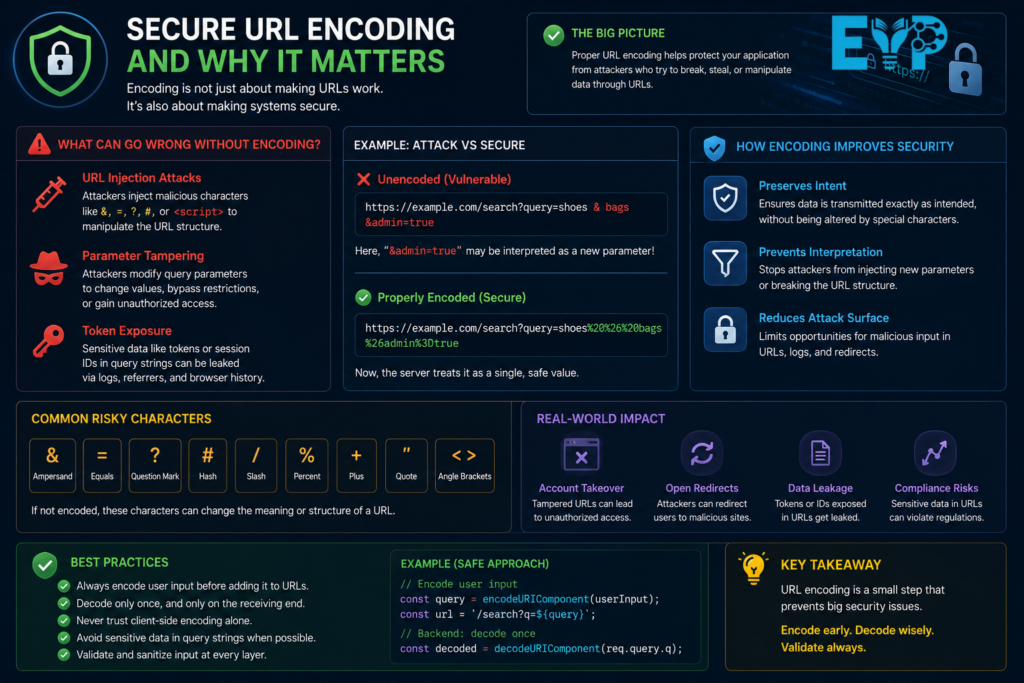
Encoding also plays a role in security, not just structure.
Without proper encoding, attackers can manipulate query strings or inject unexpected values into URLs. This can affect Session Tokens, redirects, or authentication flows.
Proper encoding helps prevent:
- URL injection attacks
- Parameter tampering
- Token exposure in query strings
In modern systems, encoding acts like a lightweight security layer before deeper validation happens.
Advanced Troubleshooting for Persistent Encoding Issues
Some encoding problems are not simple bugs. They are system-level inconsistencies.
They often appear across:
- Frontend applications
- CDN transformations
- Reverse proxies
- Backend decoding layers
This creates chained failures where every system slightly changes the data.
To fix these, developers must trace requests step-by-step from input to final response. Skipping this process usually leads to repeated bugs.
When encoding issues persist, developers should analyze server logs, inspect API payloads, and test URLs in different environments. A reliable URL Encoder helps identify hidden character mismatches or double encoding problems. Systematic debugging ensures stable data flow, prevents request failures, and improves overall application reliability.
Building a Stable URL Architecture for Long-Term Reliability
Stable systems don’t rely on assumptions. They rely on structure.
A strong URL architecture includes:
- Standardized encoding rules across all services
- Consistent parameter naming conventions
- Centralized validation layers
- Clear API documentation
- Versioned endpoints for long-term stability
When systems follow these rules, URL Encoding Errors drop significantly.
A stable URL structure depends on consistent encoding rules and clean link design. Using a reliable URL Encoder ensures special characters are handled correctly across systems. This improves scalability, reduces broken links, supports SEO performance, and maintains long-term reliability in web applications and API integrations.
FAQ: URL Encoder Spell Mistake and Encoding Errors
What is a URL Encoder Spell Mistake in simple terms?
A URL Encoder Spell Mistake happens when a URL contains characters that are not properly encoded. The browser or server cannot read the structure correctly, so the request breaks or behaves unexpectedly.
It usually comes from missing or incorrect URL Encoding, especially when special characters like spaces, &, or ? are involved.
Why do URL encoding errors happen so often in real projects?
These errors usually come from inconsistent handling across systems. One part of the system encodes the URL, another part encodes it again, and sometimes a third part expects raw input.
This mismatch creates Malformed URLs, broken Query Parameters, and unpredictable API behavior.
In short, it’s not one big mistake. It’s many small mismatches stacked together.
How does double encoding break a URL?
Double Encoding happens when an already encoded value gets encoded again.
For example:
- Original space →
%20 - Double encoded →
%2520
Now the system no longer understands the value correctly. This leads to broken filters, failed API calls, and incorrect routing in web applications.
Can URL encoding errors affect SEO performance?
Yes, they can seriously impact SEO.
Search engines may treat different encoded versions of the same page as separate URLs. This creates Duplicate URLs, wastes Crawl Budget, and weakens indexing.
It also affects Canonicalization, which can confuse search engines about the original source of content.
What is the difference between URL Encoding and URL Decoding?
URL Encoding converts unsafe characters into safe formats like %20 or %26.
URL Decoding does the opposite. It converts encoded values back into readable text.
Problems occur when encoding or decoding happens at the wrong layer, or when it happens more than once.
How do developers fix URL encoding problems?
Developers usually fix these issues by using built-in functions instead of manual string building.
For example:
- JavaScript:
encodeURIComponent() - Python:
urllib.parse.quote() - PHP:
urlencode()
They also debug requests using browser tools, API testing platforms, and server logs to identify where encoding breaks.
What characters usually cause URL encoding issues?
The most problematic characters include:
- Spaces
&ersand?question mark=equals sign#hash symbol- Non-English characters and emojis
These must always be properly encoded using Percent-Encoding rules.
Should frontend or backend handle URL encoding?
Ideally, encoding should happen in a controlled and consistent layer, not randomly in both.
If both frontend and backend encode data, you get Double Encoding. If neither does it, you get broken URLs.
Most systems standardize encoding rules to avoid confusion and ensure consistency across services.
Can URL encoding errors affect APIs?
Yes, they can completely break API communication.
Incorrect encoding can lead to:
- Missing or broken Query Parameters
- Authentication failures
- Incorrect data filtering
- Rejected requests from endpoints
This is especially common in REST API systems and microservices environments.
How can I prevent URL encoding mistakes in my project?
The best way to prevent issues is consistency and discipline.
Always:
- Use built-in encoding functions
- Avoid manual URL construction
- Validate input before sending requests
- Test edge cases like emojis and special characters
- Standardize encoding rules across all services
Once you follow these rules, most encoding errors disappear naturally.
Final Thoughts
Most URL Encoder Spell Mistakes don’t come from complexity. They come from inconsistency, rushed implementations, and missing standards.
Once you control how your system handles URL Encoding, URL Decoding, and Query Strings, most of these problems disappear naturally.
Clean URLs aren’t just technical polish. They directly affect APIs, SEO performance, and user experience.
When encoding becomes part of your system design instead of an afterthought, everything else starts working more reliably.

Muhammad Bilal is an expert blogger specializing in meanings in text, delivering clear, engaging insights that help readers understand modern language, slang, and digital communication trends.